
SafariDesk: Open-Source Help Desk for Modern Support Teams
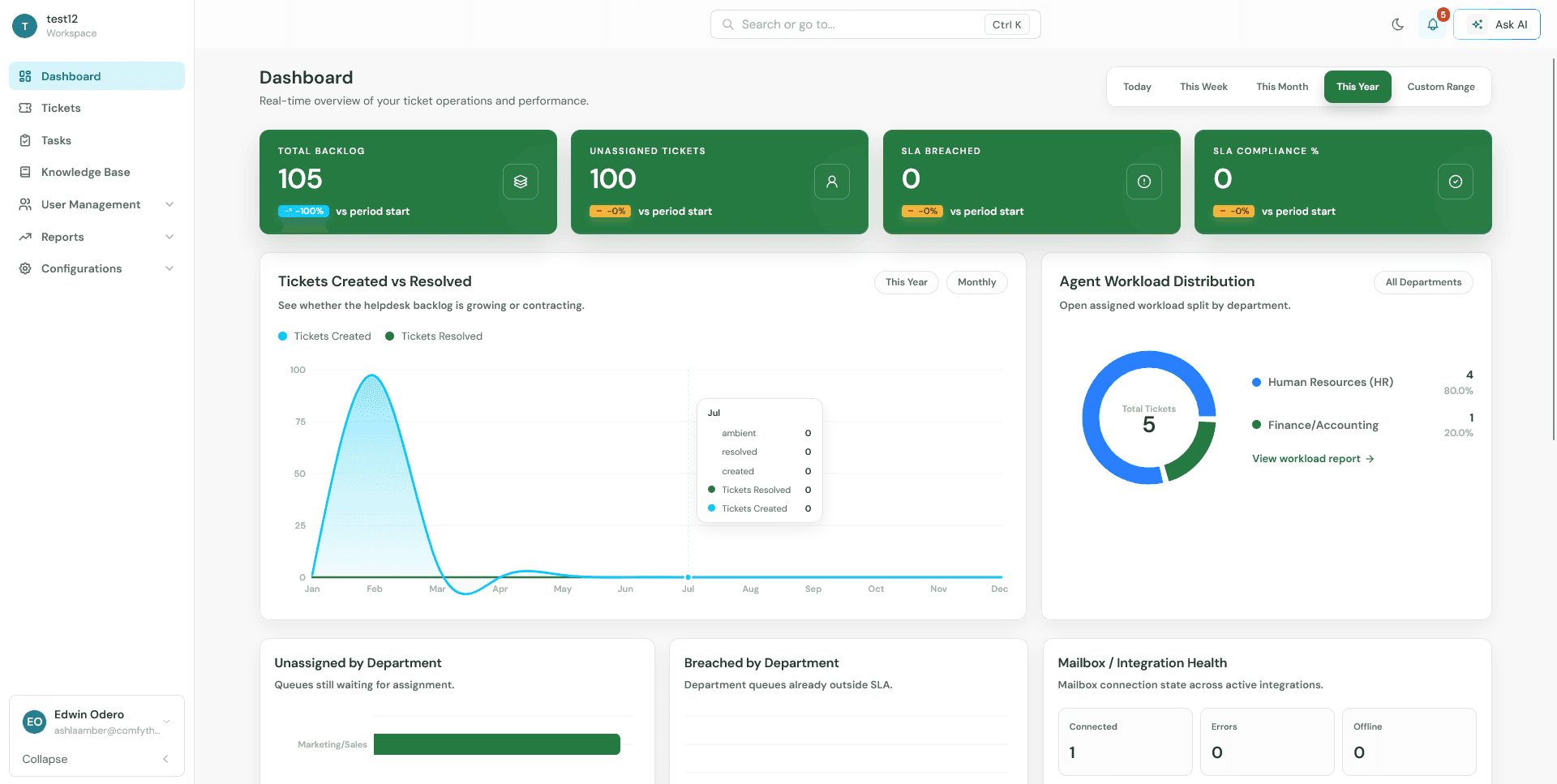
We are excited to announce the open-source release of SafariDesk - a modern help desk platform built for teams that need ticket operations, mailbox visibility, SLA reporting, and a clean self-hosted deployment path.
SafariDesk is available on GitHub
Why SafariDesk?
Support teams today face a choice between expensive SaaS platforms and legacy open-source tools that require significant customization. SafariDesk bridges this gap with a modern stack, AI-native features, and a Docker-first deployment model that gets you running in minutes.
Key Features
Ticket Management
- Multi-source ticket creation: email, web, phone, chat, API, and customer portal
- Ownership, department routing, categories, and priority levels
- SLA-aware operations with calendar, business, and custom operational hours
- Automated breach monitoring and multi-level escalations
Real-Time Dashboards
- Role-based dashboards for admins and agents
- Live metrics: backlog, unassigned work, SLA breaches, workload distribution, reopened tickets, CSAT, and mailbox health
- Flexible time windows: daily, weekly, monthly, yearly, or custom range
AI-Powered Knowledge Base
- Hierarchical categories with SEO optimization
- Semantic search using pgvector embeddings - not keyword matching
- Article versioning and analytics tracking
Email Integration
- OAuth2 support for Google and Microsoft (Gmail, Outlook, Exchange)
- IMAP/SMTP per department with provider presets
- Mailgun webhook handling for inbound email routing
- Email-to-ticket conversion with attachment handling and reply detection
AI Chatbot
- AI-powered chatbot using Google Gemini for intent analysis and semantic search
- Automated ticket extraction and conversation state management
- Token caps and overage billing configuration
Integrations
- Slack - OAuth integration for ticket notifications and SLA breach alerts
- Microsoft Teams - OAuth integration for ticket notifications and channel alerts
- Twilio SMS - Send and receive SMS messages as support tickets
- Twilio WhatsApp - Send and receive WhatsApp messages as support tickets
- Stripe - Billing and subscription management for license enforcement
- Mailgun - Inbound email routing and webhook handling
Additional Capabilities
- Task tracking and assignment
- Customer satisfaction (CSAT) surveys with internal and external modes
- Custom domains per business with DNS verification
- WebSocket support for live notifications and chat
- Background job processing with Celery and Redis
Architecture and Tech Stack
SafariDesk is built as a monorepo with a clear separation of concerns:
frontend/ React and Vite application backend/ Django API, Channels, Celery, migrations, and templates deploy/ Nginx configs and operational scripts docs/ Source files for the public documentation site
Backend
- Django 5.0 with Django REST Framework
- Django Channels with Daphne for WebSocket support
- Celery and Celery Beat for background jobs
- PostgreSQL 16 with pgvector for vector embeddings
- Redis 7 for caching, Celery broker, and Channels layer
Frontend
- React 18 with TypeScript
- Vite 5 for fast builds
- Tailwind CSS 3 for styling
- Zustand for state management
- TanStack Query for server state
- TipTap for rich text editing
Deployment
- Docker Compose with 8 services (nginx, frontend, backend, channels, worker, beat, db, redis)
- Only two custom Docker images:
safaridesk/safaridesk-frontendandsafaridesk/safaridesk-backend - Backend image reused by four services with different commands
- Single-command startup:
docker compose up -d
How SafariDesk Compares
The open-source help desk space has been dominated by tools built a decade ago on legacy stacks. SafariDesk takes a modern approach. Here is how it stacks up:
| Capability | SafariDesk | Legacy Tools |
|---|---|---|
| Tech Stack | Django 5.0, React 18, PostgreSQL 16, Redis 7 | PHP/MySQL or Ruby/PostgreSQL with older frameworks |
| Deployment | Docker Compose - one command, two images, no Kubernetes | Manual server setup with FTP uploads and web-based installers |
| AI Features | Built-in chatbot (Google Gemini), pgvector semantic search | None or requires third-party plugins |
| Real-Time | WebSocket architecture via Django Channels | HTTP polling or limited support |
| Database | PostgreSQL 16 with pgvector for vector embeddings | MySQL without vector search |
| Multi-Tenancy | Business-isolated data with custom domains | Single-tenant only |
| Knowledge Base | AI-powered semantic search, not keyword matching | Basic keyword search |
| Email Integration | OAuth2 (Google/Microsoft), IMAP/SMTP, Mailgun webhooks | Basic IMAP/POP3 polling |
| Background Jobs | Celery with Redis - async task processing | Cron-based or synchronous |
| UI Framework | React 18 with TypeScript, Tailwind CSS, Vite | Legacy jQuery or server-rendered templates |
| License | Community edition free to use and contribute | GPL-2.0 or AGPL-3.0 with copyleft restrictions |
Where SafariDesk Wins
- Modern stack - Built on Django 5.0, React 18, and PostgreSQL 16. No legacy dependencies.
- Docker-first - Run the entire platform with
docker compose up -d. No FTP uploads or manual PHP configuration. - AI-native - Chatbot and semantic search are core features, not bolted-on add-ons.
- Real-time by default - WebSocket notifications and chat without polling.
- Multi-tenant architecture - One installation serves multiple businesses with custom domains.
- No copyleft restrictions - Community edition is free to use without GPL/AGPL obligations.
Getting Started
Run SafariDesk locally from the repository root:
git clone https://github.com/SafariDeskTicketing/safaridesk.git
cd safaridesk
cp .env.example .env
docker compose pull
docker compose up -d
sh deploy/scripts/migrate.sh
sh deploy/scripts/collectstatic.sh
sh deploy/scripts/create-admin.sh
docker compose exec backend python manage.py safari
docker compose exec backend python manage.py sync_email_templates
Open SafariDesk at http://localhost:8080. Note: The default port is 80, but this example uses 8080. To customize the port, set HTTP_PORT=8080 in your .env file before starting the stack.
For production deployment, see the installation guide and production deployment guide.
Contributing
We welcome contributions from the community. SafariDesk is built by developers for developers, and we want your help to make it better.
How to Contribute
- Read the contributing guide
- Set up the local development environment
- Check existing issues and pull requests
- Submit focused changes with tests or validation notes
- Update documentation when deployment, configuration, or release behavior changes
Development Setup
cp .env.example .env
docker compose up -d --build
sh deploy/scripts/migrate.sh
sh deploy/scripts/collectstatic.sh
sh deploy/scripts/create-admin.sh
Frontend code lives in frontend/. Backend code lives in backend/. Deployment assets live in deploy/.
Join the Community
- GitHub: https://github.com/SafariDeskTicketing/safaridesk
- Reddit: https://www.reddit.com/r/SafariDesk_OS
- Documentation: https://docs.safaridesk.io
What is Next?
- Enhanced AI capabilities for automated ticket routing
- Advanced reporting and analytics
- Mobile applications
- Enterprise edition features
Try SafariDesk Today
SafariDesk is ready for production use. Deploy it with Docker Compose, connect your email channels, and start managing support tickets with a modern, AI-powered platform.
Star the repo on GitHub, join the conversation on Reddit, and let us know what features you want to see next.
SafariDesk is open-source software. The community edition is free to use and contribute to. See the LICENSE file for details.